This is a read-only archive of the Opticraft Community forums (2010–2022), preserved in October 2026. Posting, logins and registration are closed.

Started by Mr.Monkey, March 17, 2011, 06:04:25 PM

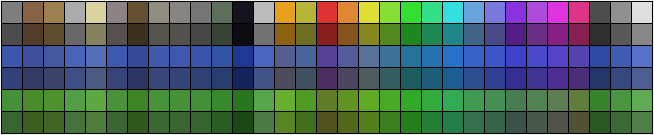
Minecraft compatible Colourpalette

Mr.Monkey

Updated with variations of water and leaves.

Terrewee

well.... i work without... so i don't need it  ;D

Spartan


Mr.Monkey

 Since I'm going to sprite on the floor for my next project I needed to modify the palette for gold and iron, since they use a different texture for the top. It is included in the zip as MinecraftFloor.gpl

Mr.Monkey

New update, with cobblestone, bricks and bookcases, also fixed the palette for the floor. I also grass, brick and TNT to it.

SpikeyThorn

pls make a code fr this EG-tells what block and weather shaded or not......  i just do blk&White 4 now cus i cant realy figure out which is which

Nick3306

Am i missing something, where is the photoshop pallet?

Mr.Monkey

#37
@Spikey It says 'shadow' in front of the blocktype if it has shadow. Can't really see what I could do different to make it easier.

@Nick Yh, I took the photoshop palette out, as it was no longer up to date and I was waiting for Toxic to update it. If you want I can upload the old one though.

Nick3306

Quote from: Mr.Monkey on May 01, 2011, 08:23:23 PM
@Spikey It says 'shadow' in front of the blocktype if it has shadow. Can't really see what I could do different to make it easier.

@Nick Yh, I took the photoshop palette out, as it was no longer up to date and I was waiting for Toxic to update it. If you want I can upload the old one though.
Please do.


SpikeyThorn


Mr.Monkey


SpikeyThorn


Toxicstriker91

Quote from: Mr.Monkey on May 01, 2011, 09:15:55 PM
http://www.youtube.com/watch?v=STGn0-sjnB8 watch at around 0:50
If this cant help you ill make a short vid on how to see witch color, and how to keep track of what color your using.Coment this below