This is a read-only archive of the Opticraft Community forums (2010–2022), preserved in October 2026. Posting, logins and registration are closed.

Started by optical, February 26, 2012, 10:01:47 AM

New theme, good or bad?

Good
50 (80.6%)
Bad
6 (9.7%)
Indifferent
6 (9.7%)

Total Members Voted: 62

New theme and top voters page

Relkeb

#105
Quote from: spamarian on February 29, 2012, 01:27:04 PM
I may not like that new facelift, but please Optical, please make bigger the letters. I use 15.4" screen and I have 115% the browser. Its so annoying.. At least for the Topics. I dotn care for the rest..

Sorry Spamarian, but I don't think he'll be making a change like that simply because one person has a small monitor. If multiple people were experiencing this issue however, that would be a different story. But honestly, I don't even think the new print is any smaller than the old.

Spamarian

I dont know dejected. I will wait to see if more argue about that, that the title of each topic is too small. Today I am at the college, and on the same pc that I use all these days(my laptop).
I dont know what is wrong, but I feel they are smaller.
We will see.

Skepter

OMG!!! I LOVE the new background theme thingy!!!
It looks epic and original :D The way the ore changes is awesome - above all, well done on making this :D

clawstrider

Another point: Not sure if this is possible, but sites like Wikipedia do this:
Can you make it so the screen (Topic pages etc.) fill up the whole of the screen space when maximised? On my desktop, about 1/3 of the space is just the black background. If this is not possible, could you center the space being used?

Wratkie

I love it! Its turning out better with every change, great work guys!

Nick3306

Quote from: clawstrider on February 29, 2012, 05:50:20 PM
Another point: Not sure if this is possible, but sites like Wikipedia do this:
Can you make it so the screen (Topic pages etc.) fill up the whole of the screen space when maximised? On my desktop, about 1/3 of the space is just the black background. If this is not possible, could you center the space being used?
What browser are you using? Because it should be centered.

clawstrider

Quote from: Nick3306 on February 29, 2012, 06:04:32 PM
Quote from: clawstrider on February 29, 2012, 05:50:20 PM
Another point: Not sure if this is possible, but sites like Wikipedia do this:
Can you make it so the screen (Topic pages etc.) fill up the whole of the screen space when maximised? On my desktop, about 1/3 of the space is just the black background. If this is not possible, could you center the space being used?
What browser are you using? Because it should be centered.

IE 9 :D

cschurz

#112
Quote from: clawstrider on February 29, 2012, 05:50:20 PM
Another point: Not sure if this is possible, but sites like Wikipedia do this:
Can you make it so the screen (Topic pages etc.) fill up the whole of the screen space when maximised? On my desktop, about 1/3 of the space is just the black background. If this is not possible, could you center the space being used?

what exactly do you mean by this:

Quotecould you center the space being used?

--

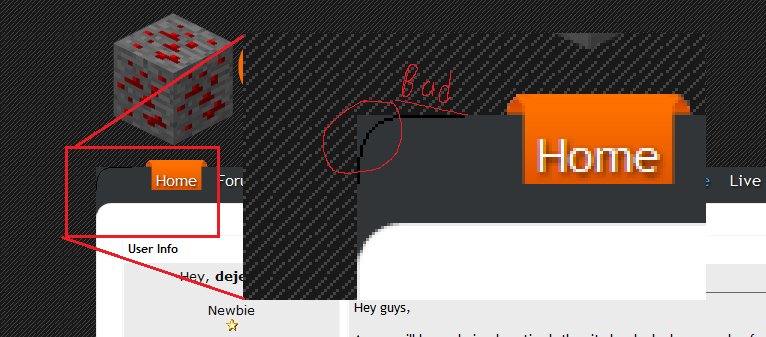
i would like to scale the content area to the size of the resolution (as it is a bit wasteful of screen space right now), but the stretching conflicts with the menu bar at the top of the page. i'm really not sure how to rework it to make that possible. i am no web designer :p

this i what i mean, for visual reference:


i don't know how to make the background of the menu bar scale in a way that doesn't make it overlap the part that should be a curve.

--

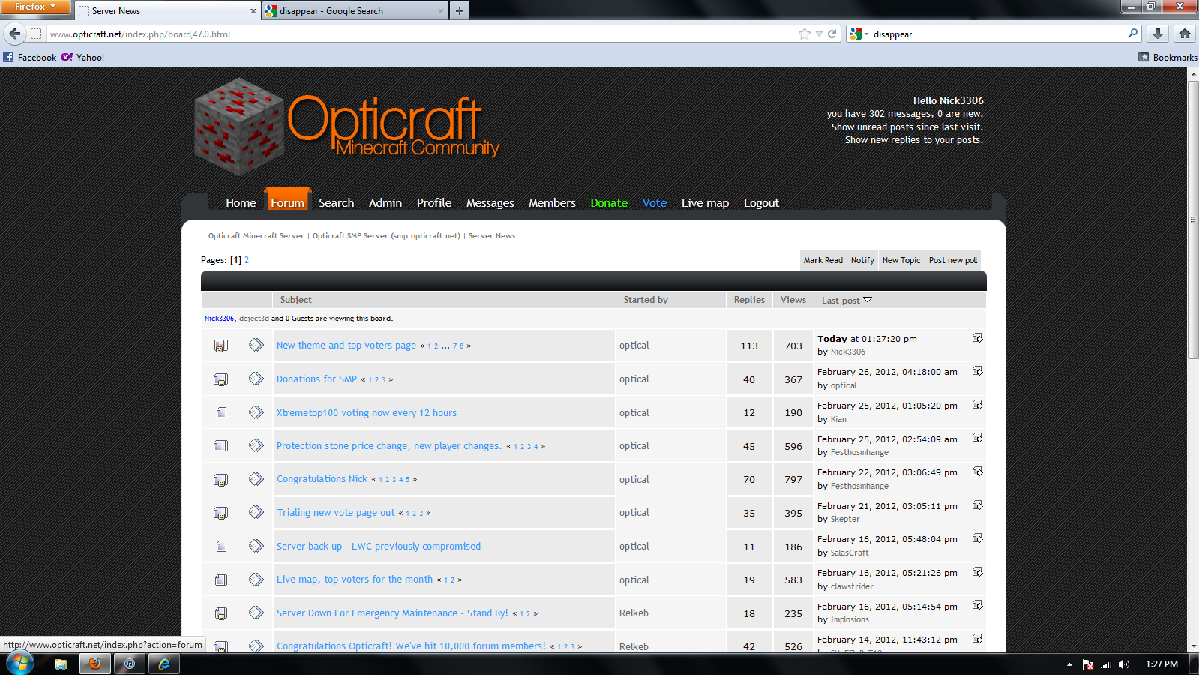
edit: lol, wow, it is pretty broken in ie9 eh. this needs to be fixed :p

edit2: and the text is quite small in ie9 as well.

switch to chrome, clawstrider

Nick3306

#113
Quote from: deject3d on February 29, 2012, 06:20:49 PM
--

edit: lol, wow, it is pretty broken in ie9 eh. this needs to be fixed :p

edit2: and the text is quite small in ie9 as well.

switch to chrome, spamarian :p
Holy shit, you are right.
Also in firefox some of the menu bar disappears.  


cschurz

Quote from: Nick3306 on February 29, 2012, 06:27:20 PM
Quote from: deject3d on February 29, 2012, 06:20:49 PM
--

edit: lol, wow, it is pretty broken in ie9 eh. this needs to be fixed :p

edit2: and the text is quite small in ie9 as well.

switch to chrome, spamarian :p
Holy shit, you are right.
Also in firefox some of the menu bar disappears.  

i simply cannot explain that one.

when inspected in firefox, the "headerim" css class does not contain the "background:" property at all, yet it is definitely in the CSS that is uploaded to the server. clearing the browser cache doesn't even fix it :p

clawstrider

Quote from: deject3d on February 29, 2012, 06:20:49 PM
Quote from: clawstrider on February 29, 2012, 05:50:20 PM
Another point: Not sure if this is possible, but sites like Wikipedia do this:
Can you make it so the screen (Topic pages etc.) fill up the whole of the screen space when maximised? On my desktop, about 1/3 of the space is just the black background. If this is not possible, could you center the space being used?

what exactly do you mean by this:
switch to chrome, clawstrider

I will get some screenies, but I have never seen anything bad about IE, which is why I haven't switched.

SHuFFleBoT10

love it, but you should make a "show new replise to your post" button

(it help's me alot)

Relkeb

Quote from: SHuFFleBoT10 on February 29, 2012, 08:43:29 PM
love it, but you should make a "show new replise to your post" button

(it help's me alot)

The "last post" button on the main forum overview? There is one, right underneath the title of each forum.

Nick3306

Quote from: SHuFFleBoT10 on February 29, 2012, 08:43:29 PM
love it, but you should make a "show new replise to your post" button

(it help's me alot)
There is one, look at the top right of the forum.

optical

The IE issues definitely have to be sorted out, it looks terrible.