This is a read-only archive of the Opticraft Community forums (2010–2022), preserved in October 2026. Posting, logins and registration are closed.

Started by butterflywolves, March 17, 2013, 05:42:12 PM

Weird flashing letters

butterflywolves

Hey my letters are like weird and blocky
[spoiler][/spoiler]
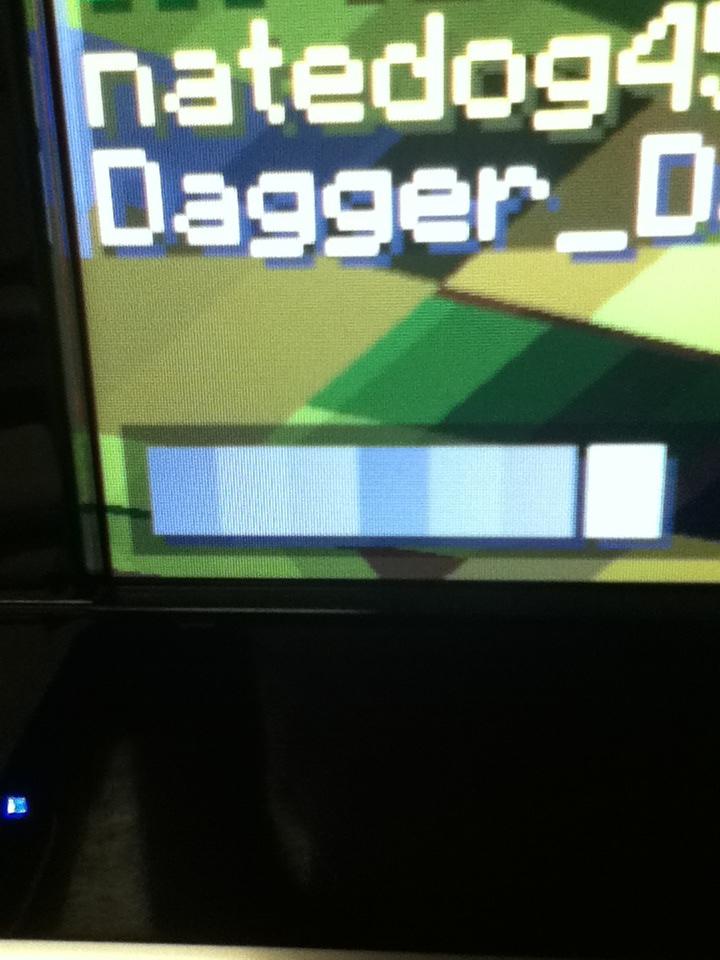
Not sure if its a bug. If you know what's going on please tell me.
(Photo taken with my iPod)

Thanks,
Butter

360OLLIE

Quote from: butterflywolves on March 17, 2013, 05:42:12 PM
Hey my letters are like weird and blocky
[spoiler][/spoiler]
Not sure if its a bug. If you know what's going on please tell me.
(Photo taken with my iPod)

"Weird and blocky." Well, minecraft text is supposed to look pixelated or "blocky." Unless your not being specific enough?

Mr_Mr_Mr

Quote from: 360OLLIE on March 17, 2013, 09:29:25 PM
Quote from: butterflywolves on March 17, 2013, 05:42:12 PM
Hey my letters are like weird and blocky
[spoiler][/spoiler]
Not sure if its a bug. If you know what's going on please tell me.
(Photo taken with my iPod)

"Weird and blocky." Well, minecraft text is supposed to look pixelated or "blocky." Unless your not being specific enough?
Did you not look at the image? The letters are squares.

▲▼Dunderheid▼▲

Texture pack? I think there is a bug that is that if you use a tp with a HD font and you have optifine installed then the cursor and spaces are that block (alt-code 219)

butterflywolves

I turned off all texture packs. I only have the opti fine mod

☣2crzy4uall☣

Quote from: butterflywolves on March 18, 2013, 10:58:35 AM
I turned off all texture packs. I only have the opti fine mod

Like I asked before, is it happening in single player?

butterflywolves

#6
Thanks I will check that. Should it be on a lab word so I have someone to talk to? Because the only say ill find out is by talking a bit.

Yes it does it in singleplayer

☣2crzy4uall☣

And I assume you've re installed Minecraft?

butterflywolves

Yes. Should I force update? It's really been bugging me that I can't see the chat I'm typing.

Mr_Mr_Mr

Quote from: butterflywolves on March 19, 2013, 10:44:23 AM
Yes. Should I force update? It's really been bugging me that I can't see the chat I'm typing.
Copy your .minecraft folder to another place on your computer, delete the one in the %appdata%/roaming folder, then force the update.

To keep your single player worlds, move your saves folder from the copied folder into the new one. Re-install optifine if you want it.

butterflywolves

#10
Thanks for the help I will try that. Tell you if anything else occurs after the update.
--------------------------
Due to the newest update (1.5.1) my problem is fixed
You can now lock this