This is a read-only archive of the Opticraft Community forums (2010–2022), preserved in October 2026. Posting, logins and registration are closed.

Started by BarbedHierodule, November 02, 2012, 08:29:10 PM

help with putting images in posts

BarbedHierodule

I don't know how to put images into a post. i pressed the insert image button but i don't know what i need to put inside this. I feel like a bit of a noob.

Thanks for any help.

plihbmaster

#1
Use an image hosting website such as imgur.
Copy the BBcode of the image and paste it inside the thing.

Better explanations here: http://www.opticraft.net/index.php/topic,13728.msg129175.html#msg129175

Felix

Or...

If the image is hosted elsewhere on the net, simply find the image address and 'wrap' it up inside img tags, like below in the code:
Code Select Expand
[img]http://Your_image_address[/img]

Hope that helps

BarbedHierodule

Thanks so much this helps a lot. Now if i've done it right there should a image here.

[image no longer available]

kagarium

Heres how to do it:


go to: http://imgur.com/

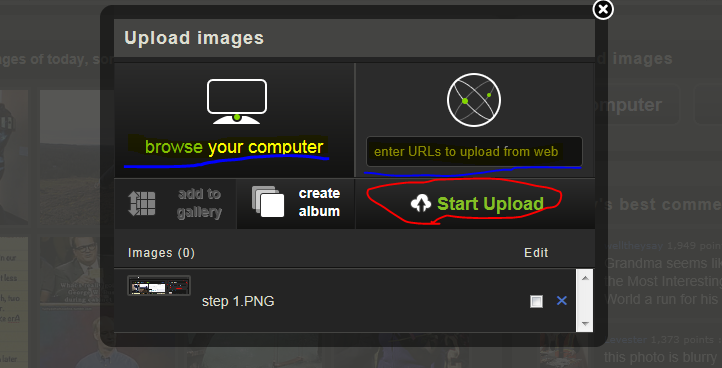
Step 1: Find the 'upload images' tab on the side (circled in red pen below) and select the 'computer' or 'web' upload button

[spoiler=step 1][/spoiler]

Step 2: You may select as many images as you want. When you have found all your images, click on 'start upload'

[spoiler=step 2][/spoiler]

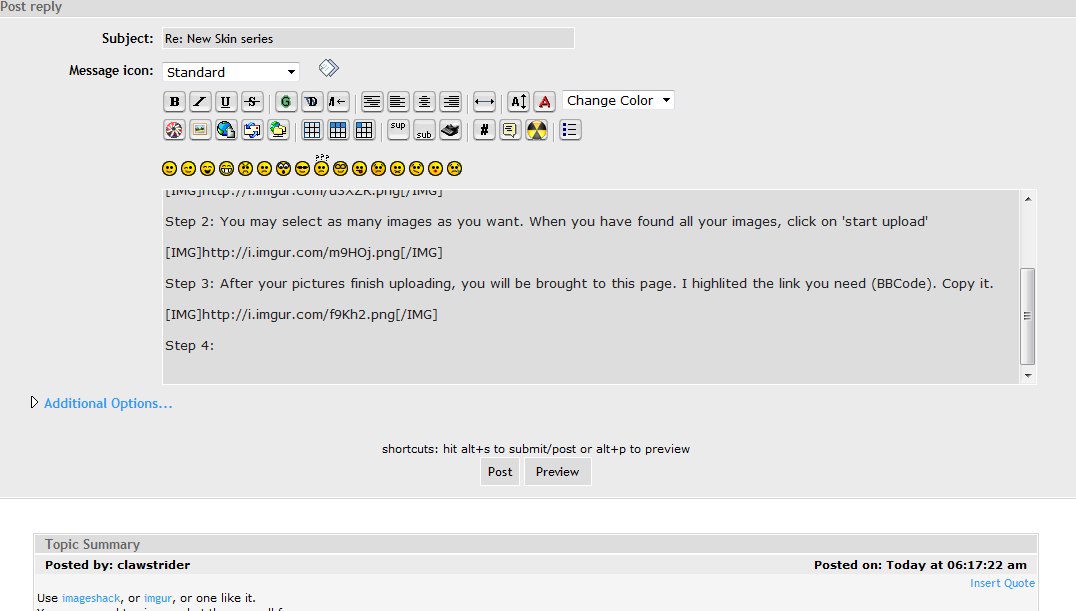
Step 3: After your pictures finish uploading, you will be brought to this page. I highlited the link you need (BBCode). Copy it.

[spoiler=step 3][/spoiler]

Step 4: in your 'post reply' or 'start new topic' message box, just paste the BBCode.

[spoiler=step 4][/spoiler]

Should come out something like this:

[spoiler=result][/spoiler]


All done!