This is a read-only archive of the Opticraft Community forums (2010–2022), preserved in October 2026. Posting, logins and registration are closed.

Started by CazualxGrenade, July 06, 2012, 08:24:43 AM

The colored text in names?

CazualxGrenade

I'm not sure if this could be offtopic or support, but when people post opticraft photos or events, how do you get the names to be a color? Like for guest, it's white, not really sure, and for a member, it would be like, black or gray, how do you get the colored names? If you know, leave a message. I would appreciate it. ;)

iGenerator

#1
Like when someone is viewing a topic and their name at the top of the page is colored?

Or how text can be colored?

gavin1928374655

Different ranks are different colors
Recruit
Builder
Crafter
Op

SalasCraft

In SMP, guests are white, members are grey, trusted are gold-ish, top voters are green, moderators are cyan, operators are blue, admins are navy blue, and owner is red.

CazualxGrenade

No, like when people post pictures of projects, there is colors on the names, is it like a plugin or something?

Tobs

#5
I'm assuming you are talking about SMP. If you are then for some people with older computers/graphics cards have problems with an update to Minecraft a while back which made all text white, not showing colours. Do you have a screenshot of what you see on your screen? It might be this problem :)

CazualxGrenade

#6
Okay, I think i have the photo here.

http://i.imgur.com/P84i6.png

Tobs

You will need to upload the file to an image hosting site such as www.imgur.com and post the BBCode here in order for other people to view it.

bhoughton

Okay i think i may know what you're talking about.

For Forum names

smp/classic op  : Is this
for Builders      : Is this
for crafters      : is this:
for smp ops      : is this
for members     : its a sky blue or a black (don't know why)
admin              : is this

But that's forum ranks

LordoftheBlock

No no, if you look at the link she's given, its her computer or Java. I know because I have the same problem when I use the computers at my school, they're older or they don't have a good version of Java or video card. I would take I look at what kind of computer you have, and maybe checking to see if you have the latest version of Java.

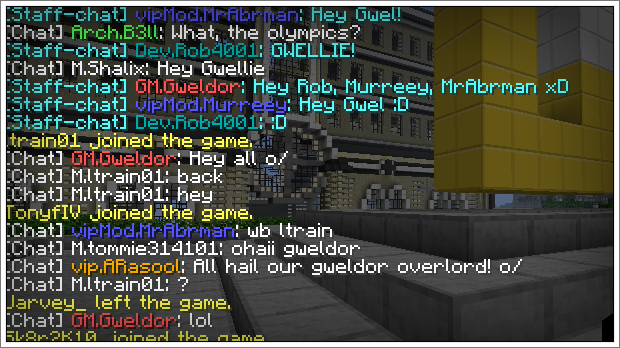
As you can see here, this is what chat looks liek for most of us (pic taken from internet search "minecraft chat"):

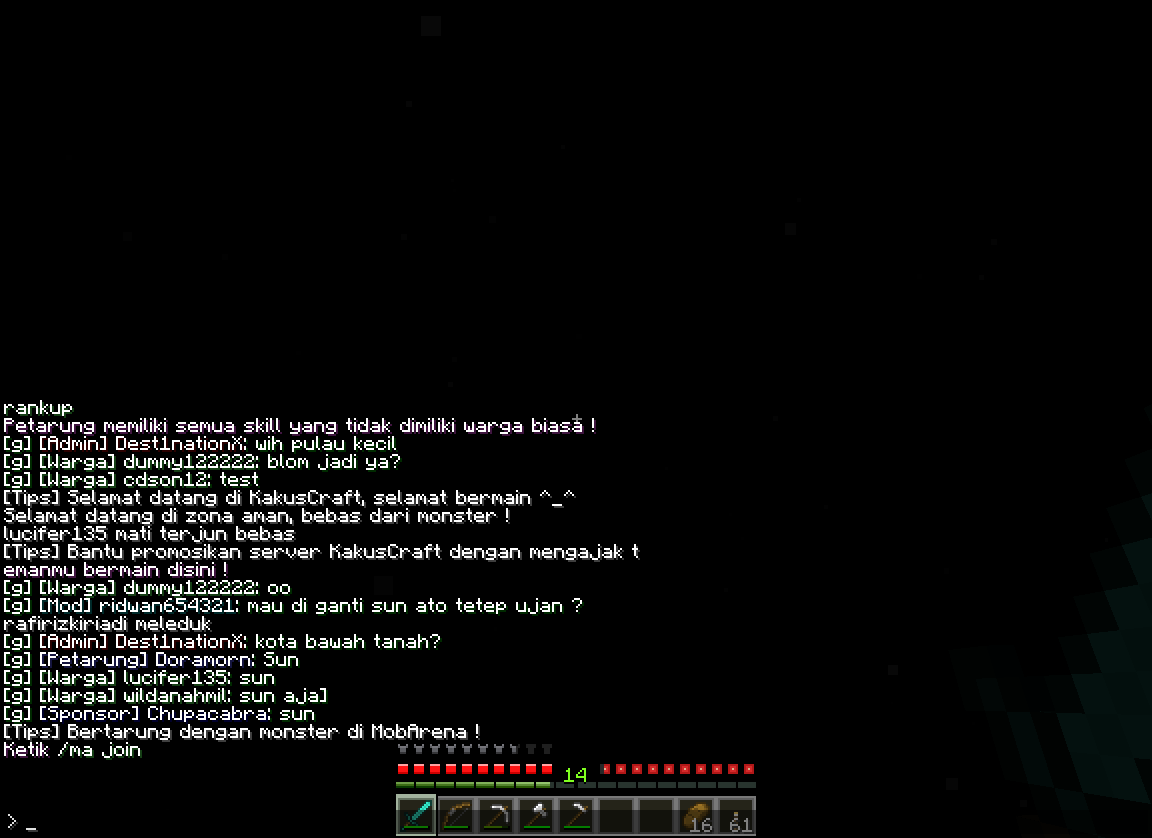
And this is what hers looks like (again pic taken from interent search "minecraft white chat"):

Hope I cleared some stuff up for you  :)

-Lord


gavin1928374655

That is a really weird glitch.

CazualxGrenade

Quote from: LordoftheBlock on July 08, 2012, 12:31:11 AM
No no, if you look at the link she's given, its her computer or Java.
alright, I'll see what the problem is, thanks lord!

LordoftheBlock

No problem; it's what I'm here for  ;)

SalasCraft

It doesn't have to do with Java, it's your graphics card.

Try updating its drivers.

CazualxGrenade